
Cross Stitch Thread Organizer
IsegrimStitchesArt & Design
4.6116.00 Reviews
- Version
- 4.10
- Installs
- 10.00K
- Age Rating
- Everyone
Screenshots
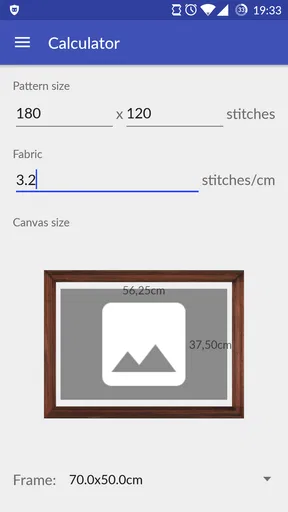
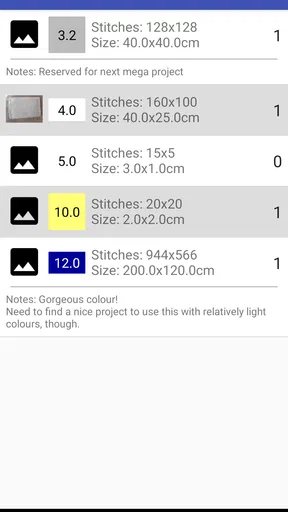
Our Review of Cross Stitch Thread Organizer
 Analysis by Appyee
I spend enough time with embroidery threads to know that the hard part is not always the stitching itself. Finding the right shade, remembering which project uses it, and keeping loose skeins from becoming an unhelpful pile can take more energy than expected. Cross Stitch Thread Organizer, made by IsegrimStitches, is designed for that practical side of the hobby. It is an Art & Design app for keeping track of threads and projects, and after using it, I see its main value as a quiet organizational tool rather than a creative workspace.
The app costs $2.99, carries an Everyone age rating, and has reached over 10K installs. Its average rating is 4.6 from around 266 ratings, which fits my impression: this is a focused tool with a clear audience, and people who need a dedicated thread record are likely to appreciate it more than casual stitchers who only own a small box of supplies.
How clearly the organizer works in everyday use
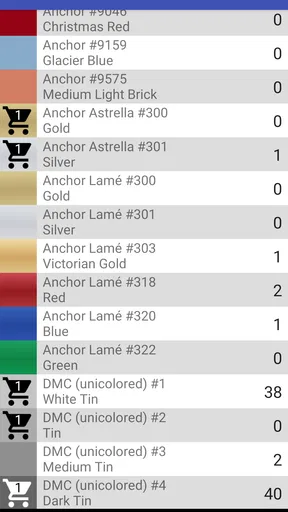
The first thing I noticed is that the app is built around information that makes sense to a cross-stitcher. Instead of forcing the hobby into a general notes app or a spreadsheet, it gives attention to thread collections and projects. That difference sounds small, but it changes how quickly I can answer ordinary questions such as “Do I already have this color?” or “Which project did I buy this thread for?”
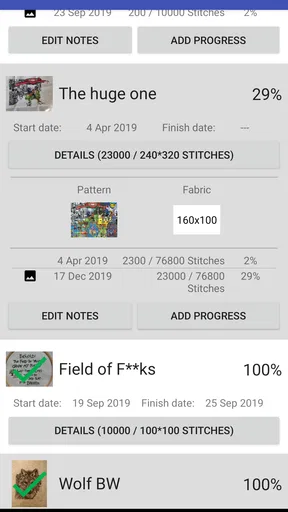
Navigation feels most useful when I approach the app with a specific task. I can think in terms of my stock, a project I am planning, or the materials connected with work already in progress. That separation is more natural than scrolling through a long note filled with color names and abbreviations. It also reduces the chance of mixing a project shopping list with threads I already own.
The interface is not trying to entertain me or turn organizing into a game. That is a strength for anyone who wants to record information quickly and return to stitching. At the same time, people who expect a polished, image-heavy planning experience may find it plain. The app’s usefulness depends on the quality of the records I create, so the setup stage requires some patience.
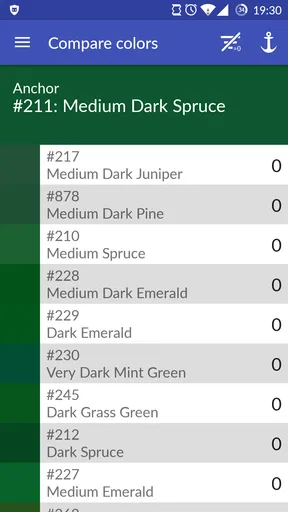
Readability matters particularly in a thread organizer because small differences between shades are important. I found it easier to work when I entered names consistently instead of switching between shortened labels, personal descriptions, and pattern terminology. A simple habit helps: I use one naming style for every thread and reserve notes for details that genuinely distinguish it from another skein.
That kind of consistency is more important here than filling the organizer with information immediately. I would rather create a dependable record of the colors I use most often than spend an evening entering every item in my craft room and then stop maintaining it. The app supports a gradual approach well: begin with one active project, then add the rest of the collection as it becomes relevant.
A practical workflow for a project night
Imagine that I am preparing to stitch after dinner. The pattern calls for several thread colors, but I do not want to empty every storage box onto the table. I open the organizer, check the project record, and compare the required shades with my existing entries. If something is missing, I can make that gap part of my shopping plan instead of buying duplicates by memory.
When I return from the craft shop, I can update the project while the information is still fresh. That small step prevents a common problem: owning the right thread but forgetting where it belongs. Later, if I pause the project for a month, the record gives me a better starting point than a half-remembered pile of materials.
My strongest tip is to treat each project entry as a working checklist, not a historical archive. I record what I have, what I still need, and any substitution or preparation note that will matter when I resume. This makes the app useful during shopping and restarting, not only during the initial setup.
Readable organization for different abilities
For users with limited attention or memory, the app can reduce the number of decisions involved in returning to a project. A written record means I do not have to remember every thread already purchased, and separating projects can make a large hobby feel more manageable. I also like that this approach supports short sessions: I can check one project without first reconstructing my entire inventory.
Users with visual differences may need to be more cautious. Thread color cannot be judged reliably from a label alone, and a digital record should not replace a physical comparison when two shades are close. I would keep a small physical sample, a marked skein, or another personal reference beside the storage system. The app can tell me what I recorded, but it cannot remove the need to distinguish real thread under the lighting where I stitch.
For someone with dyslexia, reduced concentration, or difficulty remembering abbreviations, consistent wording becomes especially helpful. I avoid entering a color one way in a project and another way in my general collection. Short notes, predictable labels, and one project at a time make the organizer less mentally demanding.
People who prefer large visual previews should temper their expectations. This is an inventory-focused tool, not a replacement for a pattern viewer or a color-matching service. I would pair it with whatever pattern format I already use rather than expecting the organizer itself to interpret every visual detail.
Motor effort and sensory comfort
Keeping a digital inventory can be physically easier than repeatedly sorting boxes, especially for someone who finds prolonged handling of small skeins tiring. A quick record on a phone may reduce unnecessary searching and lifting. In my experience, the benefit is greatest when the collection is already arranged in a sensible physical order; the app then acts as a map instead of asking me to reorganize everything from scratch.
There is still an entry burden. Typing many thread names, project details, or notes can be awkward for users with limited fine-motor control, hand pain, or fatigue. I would not try to catalog an entire collection in one sitting. Adding only the materials for the next project keeps the interaction shorter and makes the tool more likely to become part of a sustainable routine.
For people sensitive to visual clutter, a focused organizer can feel calmer than a general-purpose task app packed with unrelated lists. The trade-off is that the app does not provide the broad flexibility of a full note-taking system. I see that narrowness as helpful when I want fewer distractions, but limiting when I need to combine thread records with extensive reference material.
Users who rely on touch precision should test whether the controls feel comfortable on their particular phone. I would keep the device at a stable angle, enlarge the system text where possible, and use a stylus if tapping small controls becomes tiring. Those are practical workarounds rather than features I would attribute directly to the app.
Using it away from the craft table
The organizer becomes more valuable when I use it outside the room where my supplies are stored. A shopping trip is the obvious example. Instead of taking every thread box with me, I can check my recorded collection and focus on the colors connected to the project I want to continue. That saves space and reduces the temptation to purchase a duplicate simply because I cannot remember what is at home.
It also helps when I stitch in different places. If I move between a desk, a living room chair, and a group craft session, the project record gives me a portable reference. I can decide what to pack before leaving rather than grabbing an entire storage container. For people who have limited energy, that preparation can make the difference between starting a session and postponing it.
There is a useful accessibility angle here: situational limitations can affect anyone. Poor lighting, a busy household, travel, fatigue, or a temporary injury can make physical sorting harder. A digital inventory does not solve those conditions completely, but it can reduce the amount of searching and handling required.
I would still verify important details before making a purchase. Records can become outdated when thread is used, moved, donated, or lent to someone else. My preferred routine is to update the app immediately after finishing a project or opening a new skein. Waiting until the collection has changed several times makes the organizer less trustworthy.
Where the app is less comfortable
The largest barrier is the need to maintain accurate information. No organizer can know that I used half a skein unless I record it. If I dislike cataloging, the app may feel like another chore rather than a solution. A simple paper card beside each project could be faster for a very small collection, especially if I rarely buy supplies or work on only one design at a time.
There is also a difference between organizing and designing. Someone looking for pattern discovery, detailed visual charts, advanced color analysis, or a social stitching community should look elsewhere or use additional tools. Cross Stitch Thread Organizer addresses the management of materials and projects; it does not replace every other part of the hobby.
I also would not recommend it as the only safeguard for a valuable or historically important collection. I prefer keeping a separate backup of essential information in a format I can access independently. That is not a criticism unique to this app; it is sensible practice whenever a personal inventory becomes important. The more I depend on a digital record, the more carefully I should preserve the information itself.
Another trade-off is the app’s specialization. A general spreadsheet can be customized for unusual categories, extensive purchasing records, or shared household inventories. A notes app may be quicker for someone who wants photographs, voice memos, and long descriptions in one place. The dedicated organizer wins when thread and project tracking are the main job, but flexibility belongs to broader tools.
New users should also allow time to develop a personal system. I would not judge the app after entering one item and expecting instant order. Its payoff appears when the records reflect the way I actually store and use supplies. For example, I might group projects by status, keep a short note about a substitution, and update quantities only when they affect the next stitching session. That is more useful than recording decorative detail I will never consult.
Who will benefit most from the focused design
I think this app is a good match for stitchers who have moved beyond a tiny starter kit and regularly alternate between projects. It is particularly helpful when I buy threads in advance, forget what I own, or keep several unfinished designs. The more often I ask myself where a color belongs, the more value a dedicated record provides.
It can also suit people who want a calmer, more structured hobby routine. Instead of beginning each session with sorting, I can prepare the project record once and use it as a reference. That supports short stitching periods, which is useful when time, energy, or concentration varies from day to day.
I would suggest skipping it if the entire collection fits in one small container and I can see everything immediately. In that situation, entering and maintaining records may take longer than simply checking the box. I would also choose a different tool if my priority is pattern design, visual chart reading, or collaborative planning rather than inventory control.
The developer, IsegrimStitches, has kept the concept narrow, and I appreciate that decision. The current version is 4.10, while the app itself has been available since Mar 3, 2016. That history suggests a long-running project rather than a brand-new experiment, but I still evaluate it by how well it fits my routine, not by age alone.
My inclusive verdict for organized stitching
After using Cross Stitch Thread Organizer, I see it as a practical companion for people who want less guesswork around their embroidery supplies. Its clearest success is turning scattered knowledge into a usable project-and-thread reference. That can support memory, reduce unnecessary handling, and make shopping or restarting a design less stressful.
Its inclusive value comes from reducing friction, not from promising that every user will find the interface effortless. People with visual, motor, cognitive, or sensory needs may benefit from the focused structure, but they may also need personal adjustments such as consistent labels, physical color samples, shorter entry sessions, or an additional backup. I would build those habits around the app rather than expecting the app to handle every access need by itself.
At $2.99, I consider it a reasonable purchase for an active stitcher who is tired of duplicate supplies and forgotten project details. The price is harder to justify for a casual hobbyist with very little to organize, or for anyone seeking a complete pattern and design suite. My recommendation is therefore specific: if your thread collection has become difficult to remember, this app is worth considering; if your main challenge is creating or reading patterns, it is probably not the right center of your workflow.
My overall view is that this is a focused organizer that earns its place through repeated small conveniences. I would start with one current project, record only the threads that matter, and test whether checking the app genuinely saves time during the next shopping trip or stitching session. If it does, expanding the collection gradually should make the tool increasingly useful without turning organization into a second hobby.
Verdict
Strengths of Cross Stitch Thread Organizer
- Keeps thread colors and quantities organized in one convenient place.
- Makes it easier to find matching floss for new stitching projects.
- Useful for tracking personal thread inventories over time.
- Simple layout is suitable for both beginners and experienced stitchers.
- Can reduce duplicate purchases by showing which threads you already own.
Limitations of Cross Stitch Thread Organizer
- Initial inventory setup can take considerable time for large collections.
- Requires accurate manual updates when threads are used or replaced.
- Limited value if you only own a small number of thread colors.
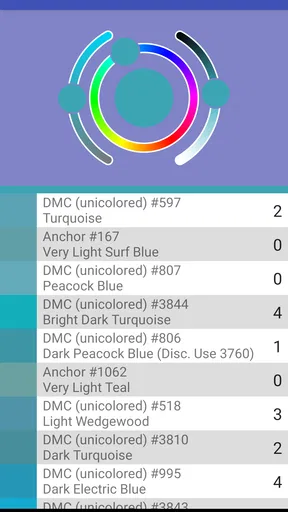
- Color matching may vary depending on your device’s screen display.
- Some useful organization features may require additional setup or customization.
Similar Picks in This Category
View All
Canva: AI Photo & Video Editor
Canva4.8

PENUP – Drawing-sharing SNS
Samsung Electronics Co., Ltd.4.5

Crafto
Kutumb App4.6

Sketchbook
Sketchbook4.1

ibis Paint X
ibis inc.4.5

Adobe Express: AI Photo, Video
Adobe4.6
Frequently Asked Questions
What is Cross Stitch Thread Organizer used for?
Cross Stitch Thread Organizer is designed to help stitchers catalog, organize, and manage their embroidery threads in one place. You can record thread brands, color numbers, names, quantities, and storage locations, making it easier to check your supplies before starting a project. It is especially useful for large collections where finding a specific shade manually can be time-consuming.
Can I use Cross Stitch Thread Organizer for different thread brands?
Yes, the app is intended to help manage threads from different manufacturers, although the exact brand support and available color databases may depend on the app version. You can generally use it to create or edit thread records, add color information, and keep your inventory organized. If you work with specialty or discontinued threads, manually adding details may be necessary.
Does the app work without an internet connection?
Cross Stitch Thread Organizer is primarily an inventory and planning tool, so many basic functions may be available offline after installation. You should be able to review saved thread information and update your collection without a constant connection. However, features such as downloading databases, synchronizing information, receiving updates, or accessing external resources may require internet access.
Can I track how many threads I own and where they are stored?
One of the most practical reasons to use Cross Stitch Thread Organizer is to keep track of your current supplies. Depending on the available fields, you can record quantities, mark colors as owned or needed, and add notes about boxes, drawers, bags, or other storage locations. This can reduce duplicate purchases and make preparation for new patterns much easier.
Is Cross Stitch Thread Organizer suitable for beginners?
Yes, beginners can use the app to build an organized thread collection from the start, while experienced stitchers may appreciate it even more when managing hundreds of colors. The main learning curve involves entering your supplies and deciding how to label or categorize them. Once the initial setup is complete, searching for colors and checking inventory should be considerably more convenient than using handwritten lists.
